Website Redesign · Spring Hill & Hernando County

Website Redesign
Spring Hill & Hernando County, FL

You know the site is old. What keeps you from touching it is the fear of losing what it already has: your spot on Google, your email, your reviews.

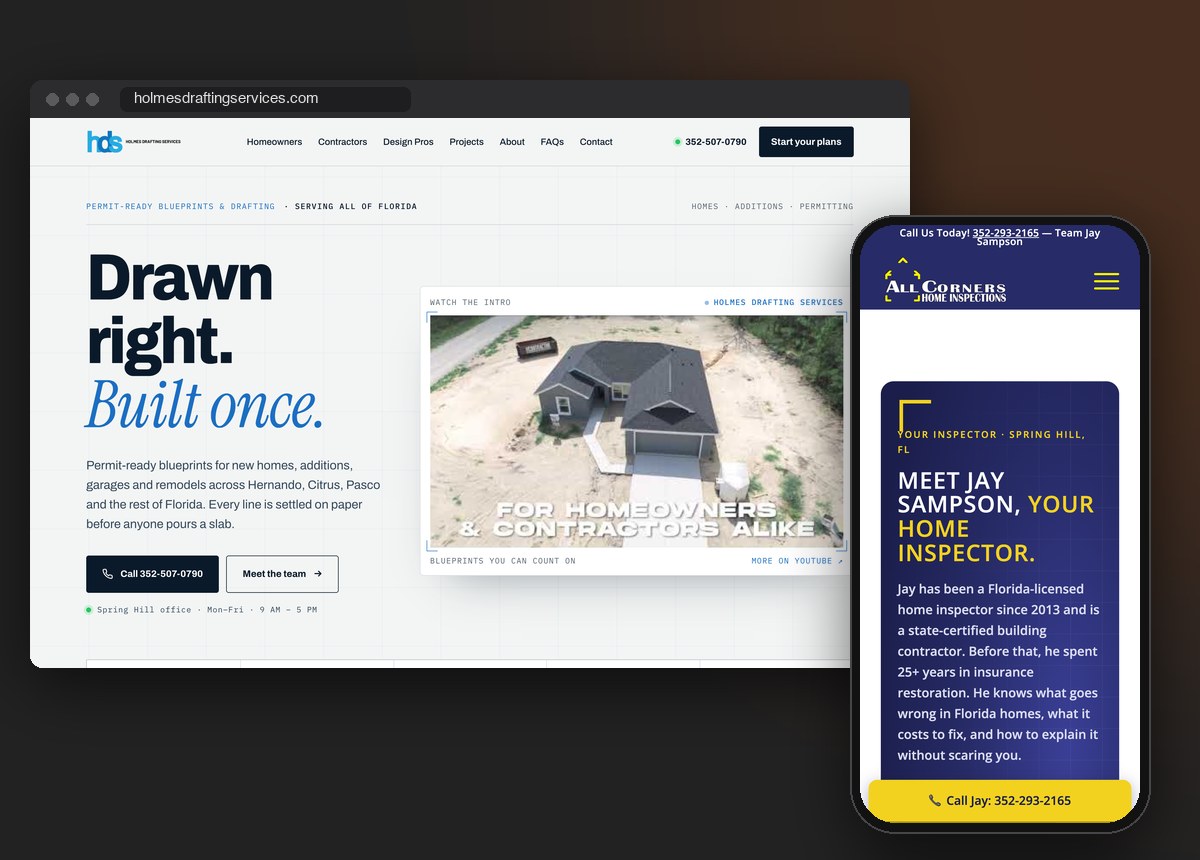
Two Spring Hill websites ApeShot redesigned: a drafting firm's homepage on a laptop and a home inspector's Your Inspector page on a phone
The Problem

The site is old. You're afraid to touch it.

Most owners who call ApeShot Productions about a website redesign in Spring Hill, Brooksville or Weeki Wachee are not asking for a prettier site. They already know theirs looks dated on a phone. What stops them is a short list of worries. The spot they hold on Google might slip. The email address printed on the trucks and business cards might stop working. The reviews might disappear. The whole site might sit blank for a month while somebody rebuilds it.

Those worries are fair, because a careless redesign can do every one of those things. A careful one does none of them. Most of what makes an old site worth keeping has nothing to do with how it looks. It is the page addresses Google has been visiting for years, the links other people saved, the domain your email runs on, and the photos and words that are actually yours.

From our studio at 4520 Commercial Way in Spring Hill, we have redesigned two working Hernando County sites that each had years of pages, links and reviews to lose, for a home inspector and a drafting firm, and we moved a care home’s website off Squarespace without touching its domain or email. Below is what we kept, what we replaced and what we let go on each job, so you can picture how yours would go.

What a Redesign Covers

Change the site, keep what already works.

01Same page addressesKeep+

Wherever possible, a new page goes onto the same address as the old one. That address is printed on business cards, saved in customers’ bookmarks, linked from other sites and sitting behind ads you may still be running, and all of them keep working when the page under it changes. Each rebuilt page also gets one main headline that says what you do and where, because that headline is one of the first things a search engine reads.

02Old links that still landLinks+

Menu links, bookmarks and links people shared years ago all need somewhere to go. When a page is retired, its address forwards to the closest match on the new site (the technical name is a 301 redirect). When an old link pointed at one section of a page, we make it open that section.

03Your own photos and peoplePhotos+

Before anything else gets picked, we go through the old site and your Google profile for pictures of your actual trucks, team and work. Stock banners are the first thing to go. If there is nothing usable, we can shoot new photos.

04Reviews on your own siteReviews+

If your reviews button sends visitors off to Google and leaves them there, we bring your real reviews onto a page of your own site, where the person deciding can read them without leaving.

05Domain and email left aloneEmail+

Your domain stays in your account. We change only the records that tell the internet where the website lives, and leave the records your email depends on exactly as they were. Your inbox does not notice the move.

06The old version, one paste awayBackup+

Before any page is replaced, its old version is saved as an unpublished copy inside your own site, plus a backup file on our side. Going back means pasting the old copy onto the page, not rebuilding anything.

Real Work · Holmes Drafting, All Corners & Care Smith

Two redesigns and a move, and what each one kept.

Three Hernando County businesses, three different starting points. One had a busy homepage that needed rebuilding without losing the people and reviews on it. One had 2022 pages with years of links pointing at them. The third was not a redesign at all: it needed its website off Squarespace without its email going quiet for a single day.

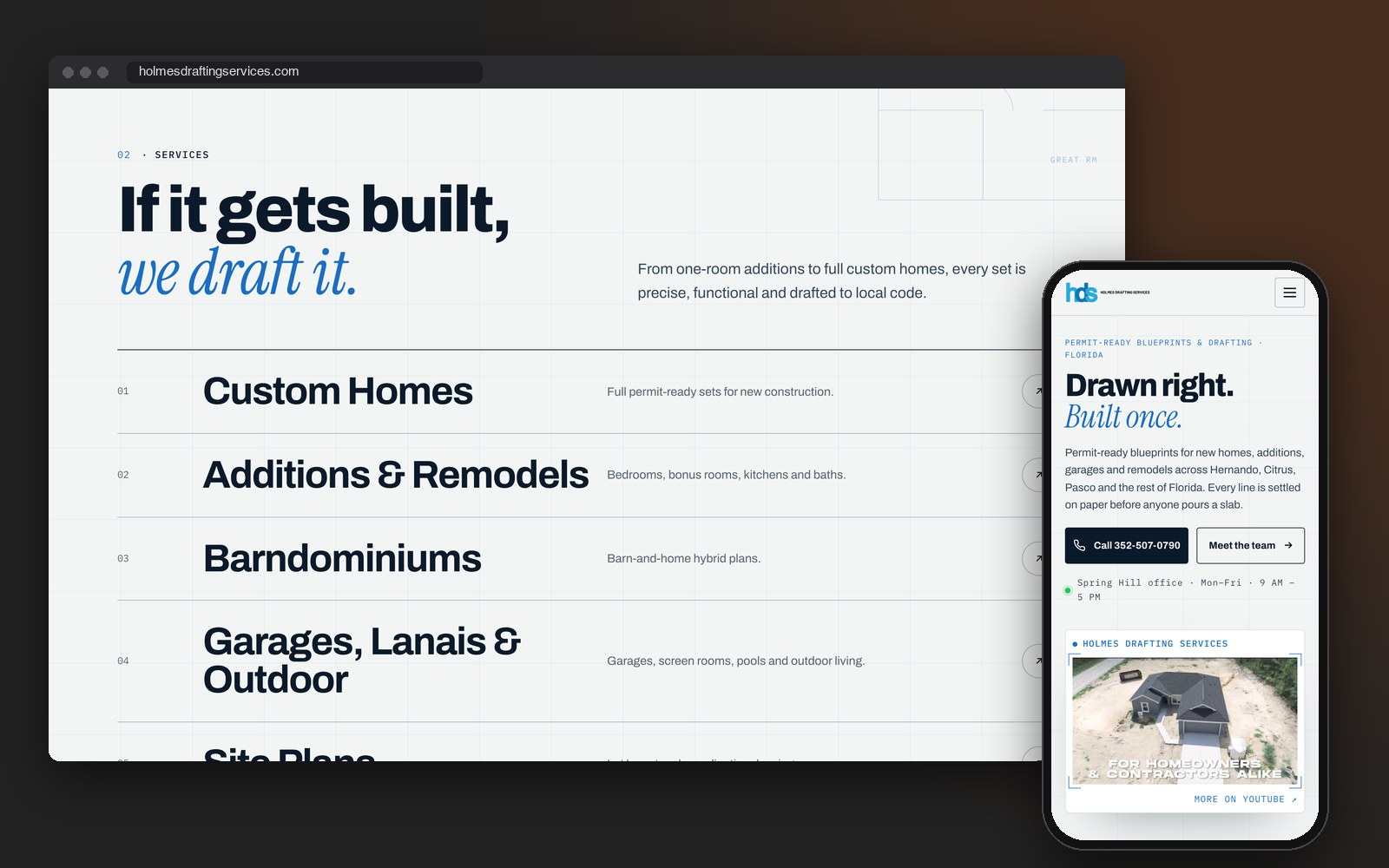
Holmes Drafting Services homepage on a laptop and phone, rebuilt in place by ApeShot Productions
01 · Drafting firm · Spring Hill

Holmes Drafting Services

Holmes Drafting had a busy homepage carrying its reviews, its team and links to every part of the site. We rebuilt it on the same page it has always lived on, and it went live on October 2, 2026, after being reviewed on a private preview. The customer reviews from the old homepage came across, shortened but never reworded, along with the owner’s portrait and the team headshots. The old page is saved in full, and the rest of the story is in the Holmes Drafting case study.

What we built
Rebuilt on the same pageTeam photos carried overReal reviews keptOld page backed up

holmesdraftingservices.com ↗

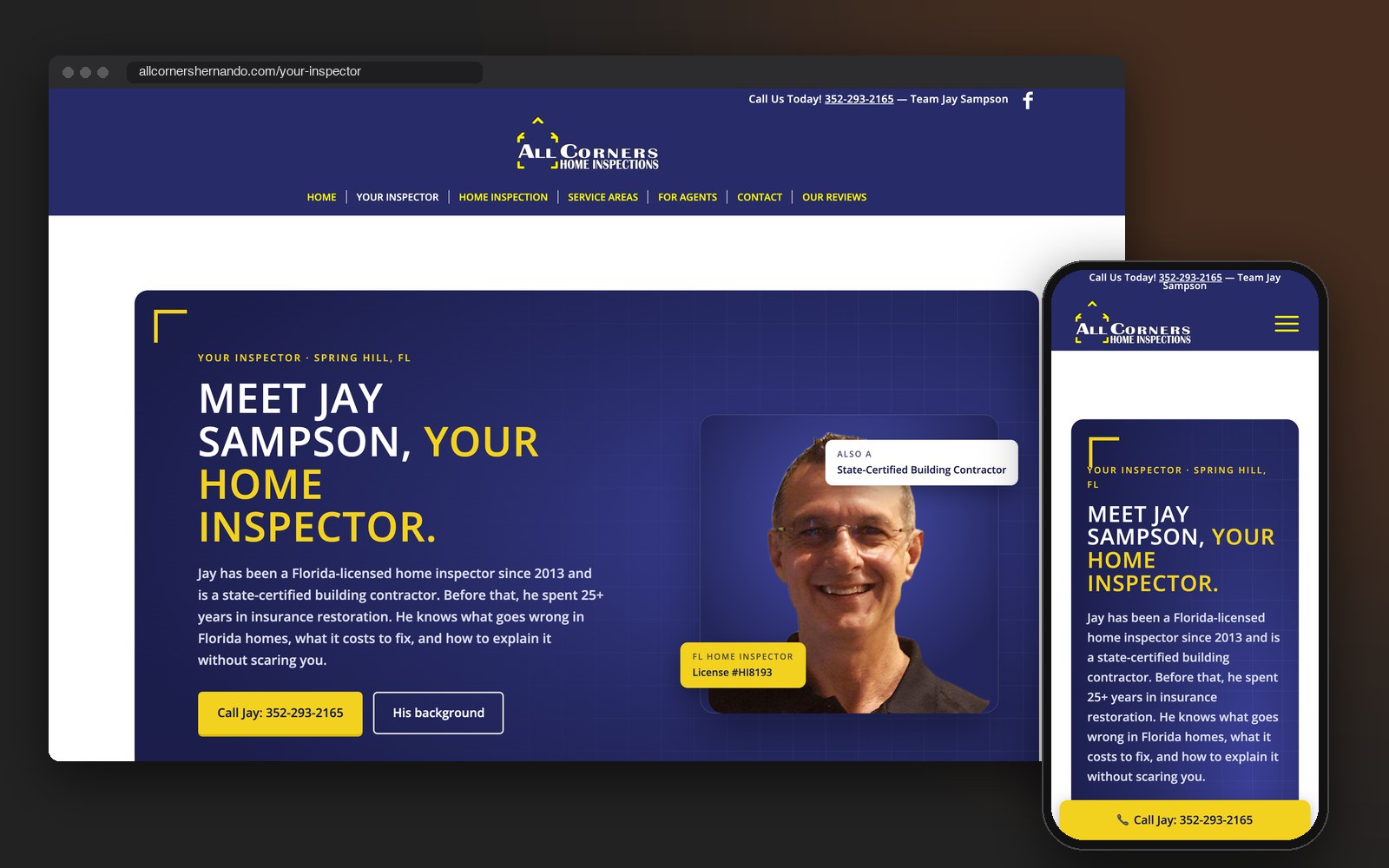
All Corners Home Inspection's rebuilt Your Inspector page on a laptop and phone, by ApeShot Productions
02 · Home inspector · Spring Hill

All Corners Home Inspection

All Corners was still running its 2022 site, with years of links pointing at it. We rebuilt the homepage (live September 25, 2026) and the Your Inspector and Home Inspection pages (live September 28), each on the address it already had, and the homepage went live once Jay Sampson gave the go-ahead. The layouts, the stock banner and a link to a dead web address are gone, and the old menu links now open the matching tab on the new pages. All three 2022 pages are still inside Jay’s site as unpublished copies.

What we built
Same addressesOld menu links still open2022 pages savedStock banner replacedReviews shortcut retired

allcornershernando.com ↗

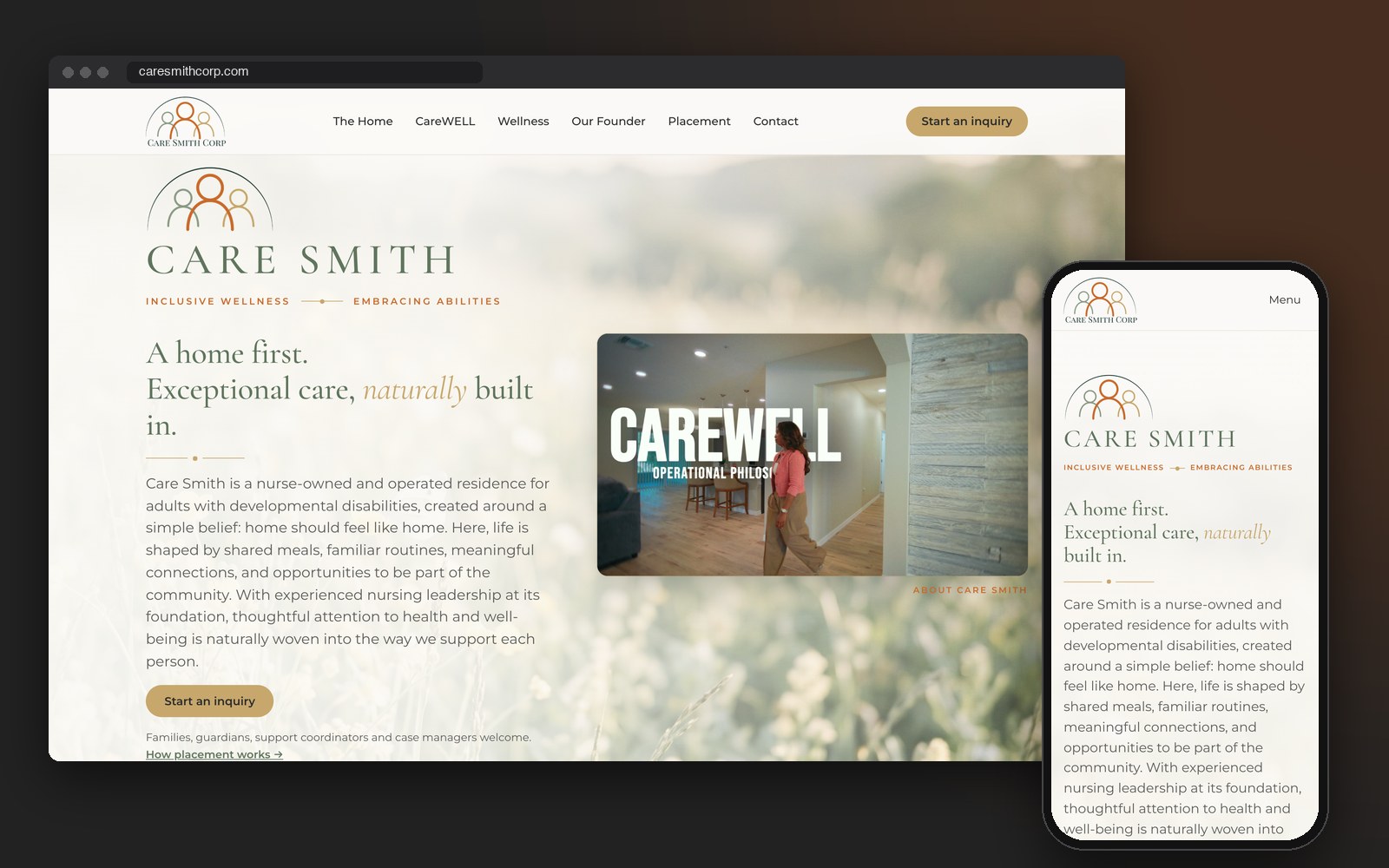
Care Smith homepage on a laptop and phone after its move off Squarespace, by ApeShot Productions
03 · Platform move · Spring Hill

Care Smith

Care Smith, a Spring Hill care home, is a platform move rather than a redesign: the website came off a Squarespace website plan and onto WordPress, on a server of its own. The domain stayed registered in the owner’s own Squarespace account, and only the records that point at the website were changed. The records her Google Workspace email runs on were never touched, which is why we picked that route. Her own About Care Smith video now plays in a frame on the homepage.

What we built
Moved off SquarespaceDomain stayed in her accountEmail never touchedHer own video, framed

caresmithcorp.com ↗

Keep, replace, retire. Before we build anything, every part of an old site goes into one of three piles. This is how the piles came out on these three jobs.

Kept: the page addresses, the old All Corners menu links (Four Point, Structure, Roof, Electrical, Attics, HVAC, Plumbing and Interior each still open the right tab), each client’s own photos and people, the real reviews, the numbers from the old Holmes Drafting counters, and, on the Care Smith move, the domain and email.

Replaced: page layouts, stock banners, and pages with no main headline or with two. The old Your Inspector and Home Inspection pages had none, and the old Holmes Drafting homepage had two. The All Corners homepage now opens on a photo of Jay’s branded truck at a Florida stucco home, taken from the business’s own Google profile, where the site’s media library before held only generic stock.

Retired: the All Corners Our Reviews menu item, which was never a page. It was a short link to a Google search from 2019, and it sat in seven places across the menu and footer. All seven now open a real reviews page on his own site. On the Care Smith move, the Squarespace website plan is lined up to be retired last, after a clean week on the new site.

Do you need a redesign at all? Answer these six about the site you have right now.

1. Can a customer call you from the top of every page on a phone?

2. Does every page have one clear headline saying what you do and where?

3. Are the photos yours rather than stock?

4. Do your reviews show on your own site, or does a button send people off to Google?

5. Does every link go somewhere that still works?

6. Can you change your own hours without calling someone who no longer answers?

If you said yes to nearly all six and the site just feels neglected, it needs looking after, not rebuilding: see website management. If it passes but nobody ever finds it, keep it and add pages: see local SEO in Spring Hill and Brooksville. If you said no to several, especially the first two, that is a redesign, and you are on the right page.

See the finished sites in the website portfolio →

Not sure yours needs a redesign? Josh will open your site with you on a free call and tell you which pile each page belongs in.

How It Works

Old site to new, without a dark day.

01List everything the old site has

Every page, every menu link, every address other sites point to, every photo and every review. Nothing comes down before it is on the list.

02Sort it: keep, replace, retire

We go through the list with you. You know which photos are really yours and which pages customers ask about. We know which addresses Google has been visiting and which links are already broken.

03Build on a private preview

The new pages are built where only you and we can see them, inside your real header and footer, so you judge them the way they will actually look. Your current site stays up the whole time.

04Swap in place, save the old copy

Each approved page goes onto its old address, and the version it replaces is saved as an unpublished copy inside your site.

05Click every old link

Then we work back through the list: menu links, bookmarked sections, retired addresses, the contact form and your email. Anything that misses gets pointed to the right place.

Common Questions

Website redesign questions, answered.

Will I lose my Google rankings if I redesign my website?
Not if the page addresses stay the same and every old link still lands somewhere useful. Most of the standing lost in a redesign comes from pages moving to new addresses with nothing forwarding the old ones. On All Corners and Holmes Drafting we rebuilt pages on the addresses they already had, and the old All Corners menu links still open the right sections. Google still decides the order of results. Our job is making sure it finds nothing broken when it comes back.
Should I redesign my website or just fix the one I have?
Fix it if it mostly works; redesign it if it loses people once they land or you cannot change it yourself. The six questions above sort it out. A site that passes but feels neglected needs website management, a site that passes but never gets found needs new pages, and a site that fails several of them is a redesign.
Can you redesign a Squarespace, Wix or WordPress website?
Yes. A WordPress site we can usually rebuild page by page on the site you already have, the way we did for All Corners and Holmes Drafting. For Care Smith we set the website up on WordPress, on its own server, and moved it off a Squarespace website plan while the domain and email stayed put. For Wix or any other builder, we check what that platform lets you take with you and tell you plainly on the call.
Can I move my website off Squarespace without losing my domain or my email?
Yes. The domain can stay registered in your own Squarespace account, and only the records that say where the website lives need to change, while the records your email depends on stay exactly as they are. That is how Care Smith moved, and her Google Workspace email kept running through it. The Squarespace website plan comes off last, after the new site has run clean for about a week, and the domain and email carry on.
Will my website be down while you redesign it?
No. The new pages are built on a private preview while your current site keeps running, and then each one is swapped onto its existing address. The old version stays saved inside your site as an unpublished copy, so if something about a new page is wrong, the old one can go back up.
How long does a website redesign take?
It depends on three things, so the honest answer comes after Josh has seen your site. Those three are how many pages need rebuilding, whether your photos and wording already exist or need making, and whether the site is changing platforms. Rebuilding a homepage on a WordPress site you are keeping is a much smaller job than moving a whole site off Squarespace. Josh will give you a straight answer on the free call.
What do I need to have ready before a website redesign?
Four things: the login for the account your domain is registered with, the login for the website itself, a note of where your email is set up, and any photos of your own work. On Care Smith, knowing from the start that the domain and the Google Workspace email were tied together decided how the whole move was done. Photos on your Google profile count too. The All Corners homepage now opens on one of them.
What's New

What goes at the top of the rebuilt homepage

A redesign tears out the hero spot anyway, so it is the natural moment to swap a borrowed photo for your own people and building. On Care Smith’s site the films do that introducing. caresmithcorp.com now plays three ApeShot films, all shot in one production day: an About film that explains the home, a video tour of the residence for families weighing a move, and an interview with founder Dr. Suzanne Levy so they hear from the nurse who runs it.

Each film settles a separate worry a family brings to that site, which a single paragraph never could. See what a company film for your website looks like.

Bring the site you're afraid to touch.

Book a free 30-minute call. Josh will go through your current site with you and say what to keep, what to replace and what to let go.

ApeShot Productions  ·  4520 Commercial Way, Spring Hill, FL 34606
352-754-0279  ·  Josh@Apeshotpro.com  ·  Open 24/7

352-754-0279Book a Free 30-Min Call
ApeShot
352‑754‑0279 Book a Free 30‑Min Call